Inrudctions
NocodeBackend is a cutting-edge no-code platform made to assist developers, entrepreneurs, and creators in creating robust backend systems without having to write any code.
NocodeBackend makes it simple to manage databases, APIs, and authentications. NocodeBackend removes the need for intricate backend programming with its drag-and-drop interface and smooth integrations.
You can save time and money on development by connecting your front-end, designing your data models, and deploying your app in a matter of minutes.
ation, and Automation from an easy-to-use visual dashboard, regardless of whether you’re launching a web application, mobile app, or SaaS product.
Perfect for startups, freelancers, and non-technical founders, NocodeBackend empowers users to bring their ideas to life faster than ever before.
It combines flexibility, scalability, and user-friendliness — making backend development accessible to everyone.
Visit: NoCodeBackend
Visit: AppSumo
Best for
Alternative to
Integrations
💡 Use Cases of NocodeBackend
- Entrepreneurs can whip up basic products fast, even without hiring backend developers. NocodeBackend lets you turn ideas into working prototypes in just days.
- App Builders: Designers and creators who use front-end tools such as Webflow, Bubble, or Adalo can link their apps to NocodeBackend for data storage, APIs, and login stuff – no coding needed.
- Freelancers & Agencies: Freelancers and digital shops can use NocodeBackend to get custom web or mobile app projects done quicker, which saves time and makes them more money.
- Internal Tools & Dashboards: Businesses can create their own internal tools – like CRMs, to-do lists, or stock systems – with NocodeBackend’s easy database and automation features.
- School Projects: Students, teachers, or newbies learning about app creation can use NocodeBackend to visually grasp backend stuff, without needing to learn a bunch of complicated programming languages.
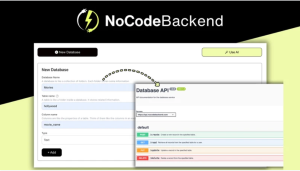
Develop APIs quickly, I mean, really quickly.
NoCodeBackend is like a magic trick for developing APIs really quickly. Simply add your database and boom— instant and secure access spots. No coding stupidity or worrying about the details.
Navigate with ease
You don’t have to be a coding expert to start. You can build APIs in minutes— great if you are in a rush or don’t want to spend a whole day on it.
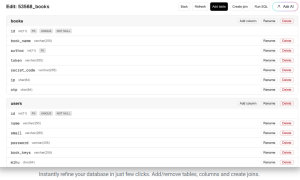
Making databases easy (thanks, AI)
This is super simple. No, don’t worry about the challenges or hassle of setting anything up.
Just a few instructions, and you have a working database for yourself. Waste less time futzing around and more time building.
The design? Simple, fast. You won’t get lost in any menus.
Even my grandma could use it, and she still calls her iPad the computer.
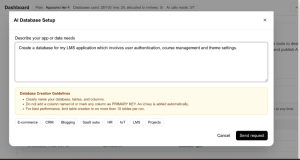
AI does the heavy lifting
The AI does the heavy lifting, too. The API will automatically see your database and make secure API access points with very little work from you. Need secure access points to be just different? No problem. It’s like a tiny robot coder that does not complain and does not need a break.
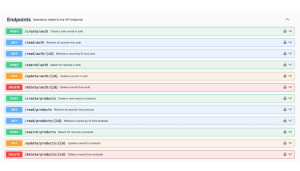
NoCodeBackend does not just give you APIs and then leave. It does not matter if you just need a little bit of documentation you want a lot. By the way, NoCodeBackend creates Swagger, and you can update it anytime you want, so you can always be current.
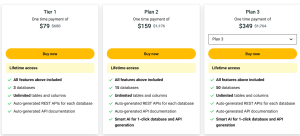
Plans & features
Deal term access to NoCodeBackend
- All future Standard Plan updates
- You must activate your license within 60 days of purchase
- Abilis & conditions
- Lifetime to upgrade or downgrade between 3 license tiers
- No codes, no stacking—just choose the plan that is right for you
60-day money-back guarantee. Try it out for 2 months to make sure it’s right for you!
🌟 Pros of NocodeBackend
- Build your backend in a snap with our simple visual interface—no coding needed!
- Get your APIs, databases, and automations up and running fast, cutting down on development time big time.
- Save money by skipping backend developers, which is great news if you’re a startup or freelancer.
- Plays nice with other no-code and front-end tools you already love, like Webflow, Bubble, and Airtable.
- Grows with you, whether you’re building a simple test project or a full-blown app.
- We’ve got user management and data protection covered right out of the box, so no extra plugins or setup needed.
Cons of NocodeBackend
- Customization is limited – It might not be as flexible as coding backends if your projects are super complicated.
- Takes Time to Learn – Even though it’s no-code, newbies might still need some time to get how backend logic and data stuff work.
- Platform Dependent – Your project’s backend totally depends on NocodeBackend’s system, and if it’s up and running.
- Pricey Plans – The really cool features might only be in the more expensive plans.
- Limited integrations – Even though there are a lot of ways to work with other services, some very specific tools or APIs might not be supported yet.
🔍 Conclusion
NocodeBackend is, honestly, pretty cool. Do you have a wild app idea at 2 AM? Well, you don’t need to be a backend developer or spend an eternity online trying to figure stuff out. Just start building! I like how I can focus on the fun things and not have to think as much about the technology.
Is it perfect? No way. Can it do literally everything? Not exactly, and there will be a limit. But it’s quick, simple, and won’t cost you an arm and a leg. That’s good enough for me. It’s not surprising that teams, freelancers, and side hustlers use it.
So, if you want to get your project out there quickly, don’t want to pay for a whole new dev position, and don’t want the technology to make you a bit crazy, try NocodeBackend. Simple, works for most ideas, and avoids a ton of headaches. What else could you want?